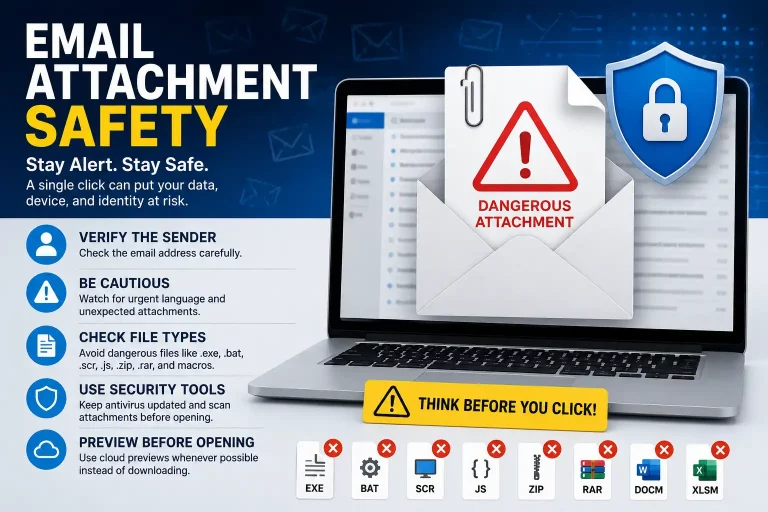
Email Attachment Safety Tips to Avoid Malware and Phishing
Email attachment safety is extremely important in today’s digital world. Cybercriminals frequently use malicious attachments to spread malware, ransomware, phishing scams, and viruses through emails that appear legitimate.
A single careless click can compromise your passwords, lock your files, steal personal information, or infect your entire computer network. Whether you use email for work, school, or personal communication, understanding how to safely handle attachments is one of the most effective ways to stay protected online.
Why Email Attachment Safety Matters
Email remains one of the most common methods hackers use to target individuals and businesses. Attackers often disguise dangerous files as normal documents or trusted communications.
Common examples include:
Invoices
Shipping notifications
Tax documents
Job applications
Password-protected files
PDFs
Microsoft Word or Excel documents
Photos or scanned documents
These emails can appear convincing and may even look like they came from a trusted company, coworker, or friend. Once the attachment is opened, harmful software may install silently in the background.
Practicing good email attachment safety habits can significantly reduce your risk of becoming a victim of cybercrime.
Common Signs of Suspicious Email Attachments
Understanding the warning signs of dangerous email attachments can help prevent malware infections and phishing attacks.
Unknown or Suspicious Sender
If you do not recognize the sender, avoid opening the attachment immediately.
Even if the display name appears familiar, always verify the actual email address carefully.
Example:
Legitimate: [email protected]
Suspicious: [email protected]
Small differences can indicate a phishing attempt.
Urgent or Threatening Messages
Cybercriminals often try to create panic to pressure users into clicking quickly.
Examples include:
“Immediate action required!”
“Your account will be suspended!”
“Payment overdue!”
“Security alert detected!”
“You won a prize!”
These scare tactics are common indicators of phishing scams.
Unexpected Attachments
Be cautious if someone unexpectedly sends:
ZIP or RAR files
Password-protected documents
Unrequested invoices
Strange PDFs
Executable files
Unexpected attachments are a major cybersecurity risk.
Poor Grammar and Formatting
Many phishing emails contain:
Spelling mistakes
Awkward wording
Unusual formatting
Low-quality logos
Broken layouts
Professional organizations usually maintain consistent branding and proper grammar.
Dangerous Attachment Types to Avoid
Certain file types are more dangerous because they can execute malicious code directly on your computer.
Be especially careful with:
.exe
.bat
.scr
.js
.zip
.rar
.docm
.xlsm
Macro-enabled Office documents can also contain harmful scripts that install malware.
Even PDFs and Word documents may contain malicious links or embedded code.
Good email attachment safety practices require extra caution when downloading or opening these file types.
Email Attachment Safety Tips
Following basic cybersecurity practices can help you avoid dangerous email attachments and phishing scams.
Verify the Sender First
If an email seems suspicious, contact the sender directly using a trusted phone number or official website.
Do not reply directly to the suspicious message.
Use Antivirus Protection
Always keep your antivirus software updated and enabled.
Modern antivirus programs can scan downloads and email attachments automatically to detect malware threats before they cause damage.
Hover Over Links Before Clicking
Phishing emails often contain fake links that redirect users to malicious websites.
Hover your mouse over any link to preview the actual destination before clicking.
Keep Software Updated
Outdated software can contain security vulnerabilities that hackers exploit.
Regularly update:
Windows or macOS
Internet browsers
Microsoft Office
Antivirus software
Email applications
Security updates help protect your system from newly discovered threats.
Disable Office Macros
Macros can execute dangerous scripts within Word and Excel files.
Unless absolutely necessary, avoid enabling macros in email attachments.
Preview Files in the Cloud
Whenever possible, use cloud preview features instead of downloading files immediately.
Services that support safer previews include:
Gmail
Outlook
Google Drive
OneDrive
Cloud previews can reduce the risk of accidentally running malicious files.
What To Do If You Open a Suspicious Attachment
If you accidentally open a suspicious attachment, act quickly to minimize potential damage.
Follow these steps immediately:
Disconnect from the internet
Run a full antivirus scan
Change important passwords
Monitor banking and email accounts
Watch for unusual computer activity
Contact an IT professional if necessary
Fast action can help prevent malware from spreading further.
Additional Email Security Best Practices
Strong email attachment safety habits should be part of a broader cybersecurity strategy.
Additional best practices include:
Enable two-factor authentication on email accounts
Use strong and unique passwords
Avoid public Wi-Fi for sensitive communications
Keep spam filters enabled
Back up important files regularly
Delete suspicious emails immediately
Educate family members or employees about phishing scams
Cybersecurity awareness is one of the most effective defenses against online threats.
Final Thoughts
Email scams and malware attacks continue to become more sophisticated every year. A message may appear completely legitimate while secretly containing dangerous malware or phishing links.
Taking a few extra seconds to verify attachments can help protect:
Your personal information
Your passwords
Your finances
Your files
Your business data
Practicing proper email attachment safety can greatly reduce the risk of viruses, ransomware, and phishing attacks.
When in doubt, avoid opening the attachment until you confirm it is safe. Staying alert remains one of the most important parts of cybersecurity.
Need Help With a Suspicious Email or Possible Virus?
If you believe you opened a suspicious attachment, clicked a phishing link, or noticed unusual activity on your computer, it is important to act quickly. Malware infections and email scams can spread fast and may put your personal files, passwords, and sensitive information at risk.
At Akal IT Services, we help individuals and businesses diagnose and remove viruses, malware, ransomware, and other cybersecurity threats.
Contact us if you notice:
- Slow or unusual computer behavior
- Pop-ups or fake security warnings
- Suspicious emails or attachments
- Unauthorized account activity
- Missing or encrypted files
- Programs opening by themselves
- Browser redirects or unwanted ads
Our team can help inspect your system, remove threats, and improve your overall computer security before the problem gets worse.
Call us today for professional IT support and malware removal assistance.